

How to Create an NTSA Business Account in Kenya

How to Create an NTSA Business Account in Kenya (2026 Complete Guide)

Share with a friend

If your business owns or plans to own vehicles, creating an NTSA Business Account should be one of your first administrative priorities. Registering company vehicles under the business rather than an individual helps ensure proper ownership records, simplifies fleet management, and supports compliance with Kenyan regulations.

From an accounting and tax perspective, vehicles registered in the company’s name also make it easier to maintain accurate business records. Subject to applicable tax laws and professional tax advice, businesses may be able to claim legitimate vehicle-related expenses and account for depreciation on qualifying assets. Registering vehicles under the company’s name also creates a clear separation between personal and business assets, making audits, financing, insurance, and future vehicle transfers much easier.

Whether you own a single company vehicle or manage a fleet of hundreds, an NTSA Business Account gives your organisation access to essential online services through the NTSA Transport Integrated Management System.

In this guide, you’ll learn everything you need to know about creating an NTSA Business Account, the documents you’ll need, and how to avoid the common mistakes that delay approval.

What Is an NTSA Business Account?

An NTSA Business Account is a company profile within the National Transport and Safety Authority (NTSA) Transport Integrated Management System. It allows registered businesses, companies, NGOs, SACCOs, schools, and other organisations to conduct vehicle-related transactions online.

Once your account has been approved, you can manage company-owned vehicles without relying on an individual’s personal NTSA account.

Benefits of Having an NTSA Business Account

Creating an NTSA Business Account offers several advantages.

1. Register Vehicles in the Company’s Name

Instead of registering vehicles under directors or employees, ownership is recorded under the business entity.

This provides:

  • Clear legal ownership
  • Better corporate governance
  • Easier transfer of ownership
  • Reduced ownership disputes

2. Better Financial Record Keeping

Vehicles owned by the business become part of the company’s assets.

This makes it easier to:

  • Record business vehicle expenses
  • Maintain proper accounting records
  • Support depreciation calculations where applicable
  • Demonstrate asset ownership during audits

Always consult your accountant or tax advisor regarding the deductibility of expenses and depreciation under Kenyan tax law.

3. Easier Fleet Management

Businesses with multiple vehicles can manage them from one account.

Services include:

4. Improved Credibility

Vehicles registered under your company present a more professional image to:

  • Clients
  • Financial institutions
  • Insurance companies
  • Government agencies
  • Suppliers

Who Needs an NTSA Business Account?

An NTSA Business Account is recommended for:

  • Limited companies
  • Sole proprietorships with business-owned vehicles
  • Partnerships
  • NGOs
  • Schools
  • Universities
  • SACCOs
  • Churches
  • Government institutions
  • Fleet operators
  • Logistics companies
  • Car hire companies

Requirements for Creating an NTSA Business Account

Before beginning your application, ensure you have the following:

  • Certificate of Incorporation or Business Registration Certificate
  • KRA PIN Certificate for the business
  • Company CR12 or equivalent company registration documents (where applicable)
  • Official company email address
  • Director’s identification documents
  • Director’s KRA PIN
  • Company phone number
  • Active eCitizen account linked to the business

Requirements may change over time, so it’s advisable to confirm the latest documentation on the official government portals before applying.

How to Create an NTSA Business Account Step by Step Guide

Step 1: Register Your Business on eCitizen

Your business must first be available within the eCitizen system. If your company does not appear under your account, you’ll need to complete the necessary linking process before proceeding with NTSA registration.

Step 2: Access NTSA Services

Easiest way to do this is login to your E-citizen account. If you don’t yet have one follow these easy steps to create one online

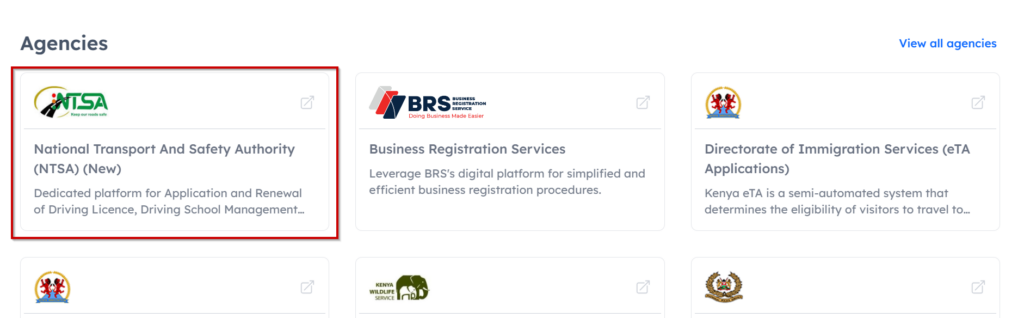
Once you’re in scroll down to all agencies and click on National Transport and Safety Authority (NTSA) (New)

NTSA Portal Image as used in the article about How to Create an NTSA Business Account in Kenya

You will then be redirected to the NTSA portal.

Step 3: Select Business Registration

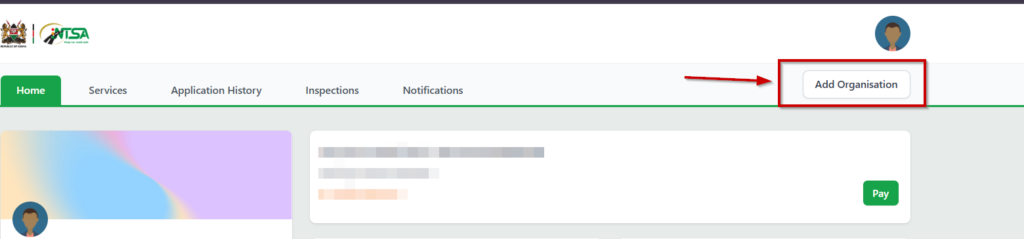
On the top right side click on Add Organisation.

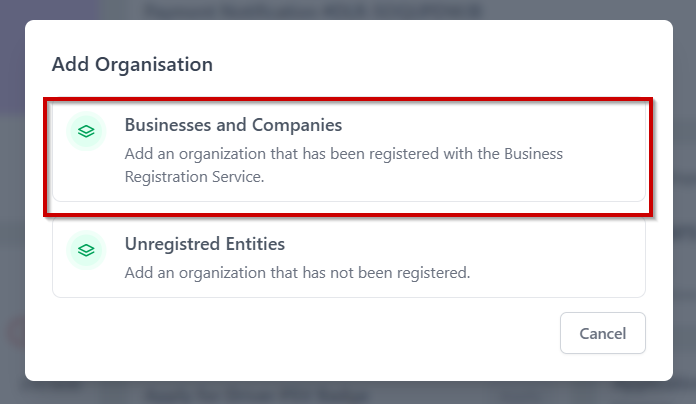
On the next tab select Business and Companies.

Business and Organisation on NTSA portal

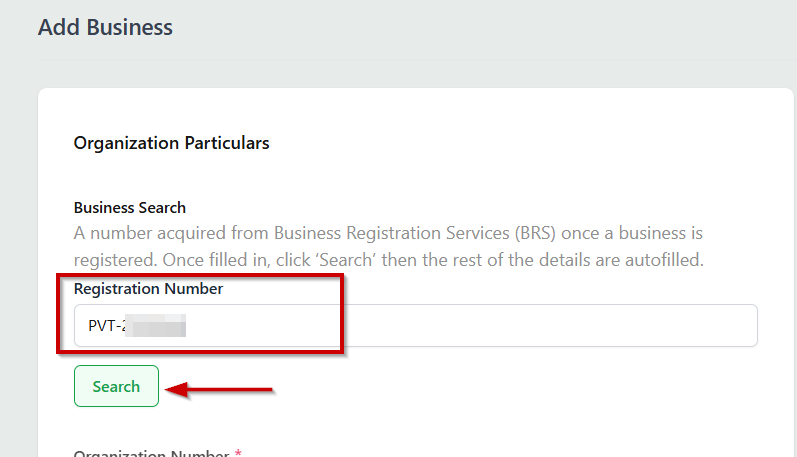
Then proceed to enter the business registration number and click on search.

Business registration number on NTSA Portal

The business details will populate below. Confirm if the details are okay and click on next.

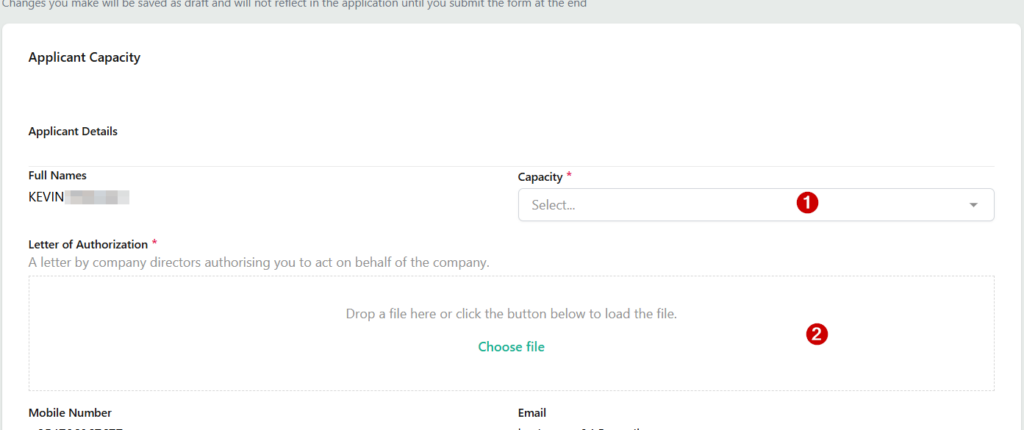
Enter your capacity in the company, Whether a manager, Authorised person or Official. Then attach A letter by company directors authorising you to act on behalf of the company. (This should be in PDF format on the company letter head signed and stamped by all directors of the company). Click Next to proceed.

A letter by company directors authorising you to act on behalf of the company. On the NTSA Portal

Share with a friend